


AI agents are becoming capable of handling complex business tasks, from responding to customer enquiries and updating CRM records to processing invoices and coordinating workflows across multiple applications. However, giving an AI agent the ability to perform tasks does not mean every action should happen automatically.
Some decisions require human judgement, particularly when an action involves money, confidential information, customer communication, business records, or irreversible changes.
This is where human approval in AI agent workflows becomes important.
By adding human approval checkpoints, businesses can let AI agents automate routine work while keeping people involved in higher-risk decisions. Instead of allowing an agent to execute every action independently, the workflow pauses when approval is required, presents the proposed action to an authorised reviewer, and continues only after receiving a valid decision.
In this guide, we'll explain how human approval works in AI agent workflows, when it is necessary, how to implement approval gates, and how frameworks such as LangGraph can support human-in-the-loop workflows.
Quick Summary
- Human approval lets a person review an AI agent's proposed action before it executes.
- Approval gates are particularly useful for financial transactions, customer communications, access changes, and sensitive business operations.
- Businesses should use risk-based approval policies rather than requiring approval for every AI action.
- An effective approval workflow should support approval, rejection, editing, escalation, and audit logging.
- Frameworks such as LangGraph provide mechanisms to pause and resume agent workflows around human decisions.
- Human approval should be combined with authentication, authorisation, validation, monitoring, and secure tool execution.
What Is Human Approval in AI Agent Workflows?
Human approval in AI agent workflows is a control mechanism that requires an authorised person to review and approve a proposed action before an AI agent executes it.
It is commonly implemented through a human-in-the-loop (HITL) process.
In a typical AI agent workflow, an agent receives a request, analyses the available information, selects the tools it needs, and prepares an action. If that action requires approval, the workflow pauses and sends the proposed action to a human reviewer.
The reviewer can then:
- Approve the proposed action.
- Reject the action.
- Edit the proposed action, where the workflow supports editing.
- Request additional information.
- Escalate the request to another authorised person.
After the decision, the workflow either resumes, changes direction, or stops.
For example:
Imagine an AI agent that helps a finance team process supplier invoices. The agent extracts invoice information, checks purchase orders, verifies supplier details, and prepares a payment request.
The agent may be allowed to complete these checks independently. However, before a payment is submitted, the workflow requires approval from an authorised finance manager.
This approach allows the business to benefit from automation without removing human accountability.
Human-in-the-Loop vs Human-on-the-Loop vs Fully Autonomous AI
Not every AI workflow needs the same level of human involvement. The right approach depends on the task, its potential impact, and the level of risk the business is willing to accept.
1. Fully Autonomous AI
A fully autonomous workflow allows an AI agent to complete an authorised task without requesting human approval during execution.
For example, an AI agent might categorise incoming support tickets, identify their priority, and route them to the appropriate department.
This approach is suitable for clearly defined, low-risk tasks where the actions are reversible and the system has appropriate permissions.
2. Human-in-the-Loop AI
Human-in-the-loop AI requires a person to participate in a decision or approve an action before the workflow continues.
For example, an AI agent can prepare a customer refund request, but a finance employee must approve it before the refund is processed.
This is useful when a decision has financial, operational, legal, or reputational consequences.
3. Human-on-the-Loop AI
In a human-on-the-loop model, the AI agent operates independently while people monitor its activity and intervene when necessary.
For example, an AI system may continuously monitor support conversations and automatically handle routine requests. A supervisor can review flagged conversations or intervene when the system behaves unexpectedly.
4. Human-in-Command AI
Human-in-command gives people broader control over the AI system. Humans define the operating rules, permissions, boundaries, and conditions under which the agent can work.
For example, an organisation may allow an AI agent to manage selected internal processes while restricting access to financial approvals, employee records, and sensitive business decisions.
The key difference is the level of human control.
A practical enterprise AI system may combine all four approaches depending on the workflow and risk level.
Why Do AI Agent Workflows Need Human Approval?
AI agents can make mistakes, misinterpret instructions, select incorrect tools, or act on incomplete information. Even when an agent performs well in routine situations, its actions may have consequences that require human judgement.
Here are the main reasons businesses should consider human approval.
1. Prevent Unauthorised Actions
An AI agent may have access to business applications such as CRM platforms, ERP systems, email services, and payment tools.
Without appropriate controls, an agent could perform an action that exceeds the user's intended request or its assigned authority.
For example, an agent may prepare a customer account update, but the change should not be applied until an authorised employee reviews it.
An approval gate helps ensure that important actions are checked before execution.
2. Improve Decision Accuracy
AI systems can generate incorrect information or make decisions based on incomplete context.
A human reviewer can identify problems that may not be obvious to the agent, such as an incorrect invoice amount, an unusual customer request, or a missing approval document.
Human review is especially valuable when the information is ambiguous or the consequences of an incorrect decision are significant.
3. Protect Sensitive Business Information
Business workflows frequently involve confidential information, including customer records, employee details, financial information, contracts, and internal documents.
Before an AI agent sends, shares, changes, or deletes sensitive information, the workflow may require approval from an authorised person.
Approval should be supported by proper access controls. A person should not be able to approve an action simply because they can open the approval screen.
4. Maintain Accountability
Businesses need to understand who authorised important actions and when they were performed.
An approval workflow can record:
- The action proposed by the AI agent.
- The information presented to the reviewer.
- The identity of the reviewer.
- The approval or rejection decision.
- The date and time of the decision.
- The result of the executed action.
These records help organisations investigate errors, review decisions, and demonstrate that appropriate controls were applied.
5. Build Trust in AI Automation
Employees may hesitate to use AI agents if they believe the system can independently make important decisions without oversight.
A transparent approval process gives employees visibility into what an agent intends to do and allows them to intervene when necessary.
This makes it easier to introduce AI automation into business processes where human accountability remains important.
Which AI Agent Actions Should Require Human Approval?
A common implementation mistake is requiring human approval for every action. This can make automation slow and create unnecessary work for employees.
Instead, businesses should classify actions based on risk.
The following table provides an illustrative starting point. Actual approval requirements should be defined by the organisation's policies, industry obligations, and risk assessment.
| AI agent action | Suggested control | Reason |
|---|---|---|
| Categorising support tickets | Usually no manual approval | Low-impact and reversible |
| Summarising internal documents | Usually no manual approval | No external action is performed |
| Drafting customer emails | Review may be optional | Content can be checked before sending |
| Sending sensitive customer emails | Human approval | Potential customer and reputational impact |
| Updating CRM contact details | Policy-based approval | Depends on the data and change |
| Issuing refunds | Human approval based on policy | Financial impact |
| Initiating supplier payments | Strong approval controls | Financial and fraud risk |
| Changing user permissions | Human approval | Security implications |
| Deleting business records | Strong approval controls | Potentially irreversible |
| Signing or submitting legal documents | Authorised human decision | Legal consequences |
The important principle is to match the level of oversight to the potential impact of the action.
How to Design a Human Approval Workflow for AI Agents
A well-designed approval workflow should make it clear when the AI agent can proceed independently and when it must wait for a human decision.
The following steps provide a practical workflow.
Step 1: Receive the User Request
The workflow begins when a user submits a request.
For example:
"Prepare a refund for customer ABC because the product was delivered damaged."
The AI agent receives the request and identifies the task, relevant customer information, and actions required.
Step 2: Let the AI Agent Analyse the Request
The agent gathers relevant information and prepares a proposed action.
For a refund workflow, it may:
- Retrieve the customer record.
- Check the order details.
- Review the refund policy.
- Verify the payment status.
- Calculate the proposed refund amount.
- Prepare a refund request.
At this stage, the agent should be preparing the action rather than executing a restricted operation.
Step 3: Evaluate the Action Against Business Policies
Before execution, the workflow checks whether the proposed action requires approval.
The policy engine can consider factors such as:
- Financial value.
- Data sensitivity.
- User permissions.
- Action reversibility.
- Customer impact.
- Regulatory or internal policy requirements.
For example, a business may allow an agent to prepare refunds but require a finance manager to approve refunds above a defined threshold.
The threshold should be configured according to the organisation's actual policy rather than assumed by the AI agent.
Step 4: Pause the Workflow
If approval is required, the agent should pause before performing the restricted action.
The approval request should contain enough information for the reviewer to make an informed decision.
A useful approval request includes:
- Original user request.
- Proposed action.
- Relevant customer or transaction details.
- Amount or data being changed.
- Reason the agent recommends the action.
- Supporting evidence.
- Risk level.
- Available approval options.
Avoid sending a reviewer a vague message such as "The AI needs approval."
The reviewer should understand exactly what they are approving.
Step 5: Collect the Human Decision
The reviewer receives the approval request through an authorised interface.
The available actions may include:
- Approve.
- Reject.
- Edit and approve.
- Request more information.
- Escalate.
The system should verify that the reviewer is authorised to make that decision.
Step 6: Validate the Decision
The system should validate the approval before allowing the agent to continue.
For example, it should check:
- Is the approval linked to the correct workflow?
- Is the reviewer authorised?
- Has the request expired?
- Has the proposed action changed since approval?
- Has the action already been executed?
- Does the action still comply with current policy?
If the proposed action changes materially after approval, the workflow should request approval again.
Step 7: Resume or Stop the Workflow
If the action is approved and all checks pass, the execution controller allows the workflow to continue.
If the action is rejected, the workflow should stop the restricted operation and record the decision.
If the reviewer requests changes, the agent may revise the proposal and submit it for another review.
Step 8: Record the Approval in an Audit Log
The system should retain an appropriate record of the approval process.
The audit log can include:
- Workflow or request ID.
- Proposed action.
- Approval policy applied.
- Reviewer identity.
- Decision.
- Decision timestamp.
- Changes made by the reviewer.
- Execution result.
- Error or rejection reason, where applicable.
The audit log should be protected from unauthorised modification and should follow the organisation's data-retention requirements.
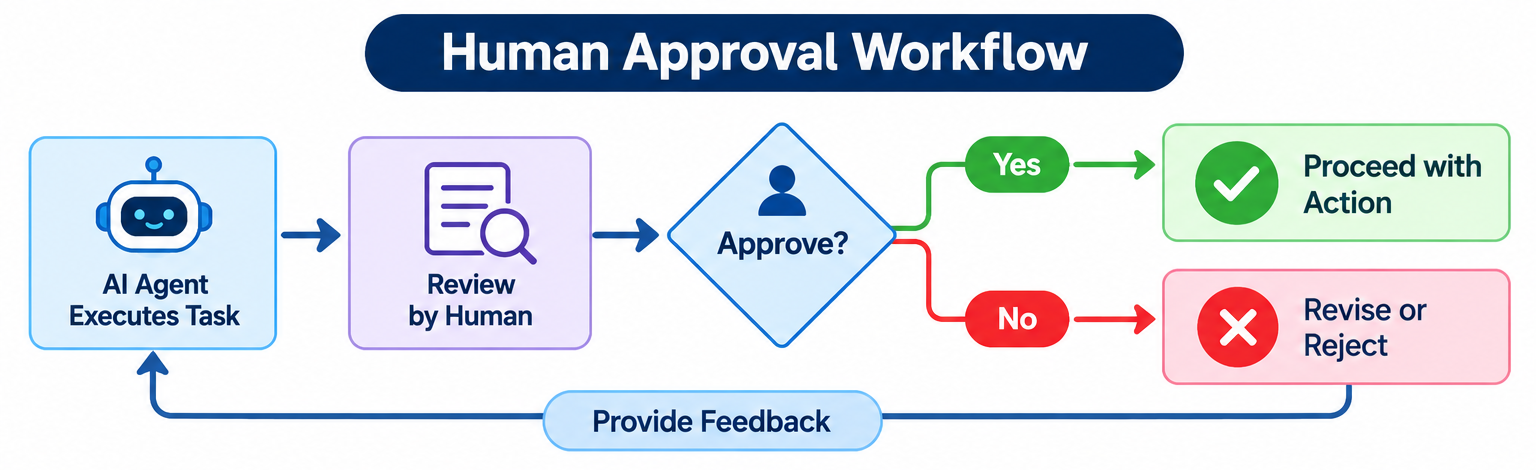
Human Approval Workflow: Example Diagram
Use the standalone workflow diagram with this section:
How to Implement Human Approval in AI Agent Workflows
There are several ways to implement human approval, depending on the AI framework, application architecture, and business requirements.
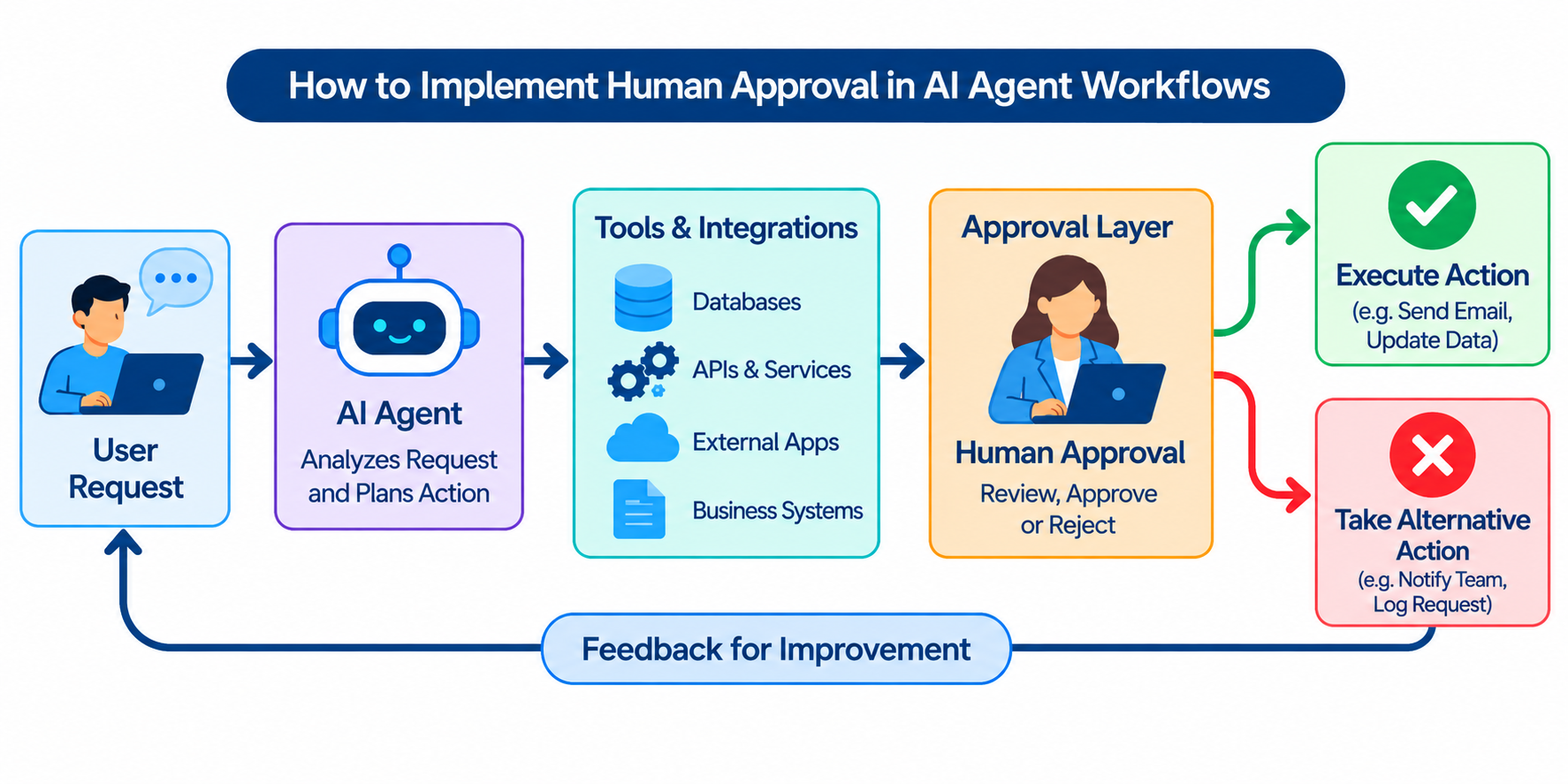
A typical implementation includes the following components:
- AI agent: Understands the request and prepares the proposed action.
- Policy engine: Determines whether the action requires approval.
- Workflow controller: Pauses and resumes the execution process.
- Approval interface: Allows an authorised person to review the request.
- Execution layer: Performs the approved action after checking permissions.
- Audit system: Records decisions and execution results.
The approval interface may be part of a web application, an internal dashboard, or an integrated business system.
Step 1: Define the Tools Available to the Agent
Start by identifying which tools the AI agent can use.
For example, a customer operations agent may have access to:
- CRM search.
- Customer record retrieval.
- Order lookup.
- Refund request preparation.
- Email drafting.
- Refund execution.
Separate tools that prepare actions from tools that execute them.
For example, `prepare_refund` can calculate and prepare a refund request, while `execute_refund` performs the actual financial operation.
The execution tool should not be accessible through an unrestricted path that bypasses the approval policy.
Step 2: Define Approval Rules
Create clear rules that determine when human approval is required.
For example:
- Routine information retrieval may proceed automatically.
- Drafting an external email may proceed without sending it.
- Sending a sensitive customer communication may require approval.
- Refunds may require approval based on amount or policy.
- Changes to access permissions may require an authorised administrator.
Keep these rules in a controlled policy layer rather than relying only on instructions written in the AI agent's prompt.
Step 3: Create an Approval Interface
The reviewer should receive a clear summary of the proposed action.
A practical approval screen could contain:
Approval request
- Request ID: REF-1042
- Action: Process customer refund
- Customer: ABC
- Proposed amount: ₹12,000
- Reason: Product delivered damaged
- Policy check: Approval required
- Supporting information: Order details and delivery record
Available decisions
- Approve
- Reject
- Request changes
This is an illustrative interface, not a real transaction or a claim about a Spectrum customer implementation.
The interface should authenticate reviewers and enforce role-based permissions.
Step 4: Pause the Agent Before Execution
The workflow should stop before calling the restricted tool.
The agent can save the proposed action and wait for the approval service to return a decision.
This is important because the agent should not be able to execute the action simply by generating a response that says approval has been granted.
The approval decision must come from a trusted application component.
Step 5: Resume Execution After Approval
Once the approval service confirms a valid decision, the workflow controller can resume the agent.
Before execution, the application should re-check the reviewer's authority, the action details, and the current business policy.
The execution layer should receive only the approved action and should reject any unauthorised changes.
Step 6: Add Audit Logging and Error Handling
Record the decision and execution result.
The workflow should also handle:
- Rejected requests.
- Expired approval requests.
- Reviewers who do not respond.
- Duplicate approval submissions.
- Failed tool execution.
- Changes to the proposed action.
- Requests that require escalation.
A production implementation should not depend on a person keeping an approval page open. The workflow state should be stored durably so that the process can resume later.
Example: Adding Human Approval with LangGraph
LangGraph provides workflow mechanisms for building stateful AI applications. Its interrupt functionality can pause a workflow and wait for an external decision before continuing.
This can be useful when an AI agent needs human approval before calling a sensitive tool.
For example, an agent may prepare an email and request approval before sending it.
The following is a simplified illustrative example:
from langgraph.types import interrupt, Command

def approval_step(state):
    decision = interrupt({
        "action": "send_email",
        "recipient": state["recipient"],
        "subject": state["subject"],
        "body": state["email_body"],
        "message": "Review and approve this email before sending."
    })

    if decision["approved"]:
        return Command(
            update={"approval_status": "approved"},
            goto="send_email"
        )

    return Command(
        update={"approval_status": "rejected"},
        goto="end"
    )
How This Code Works
1. The workflow reaches the approval step
The agent prepares an email and passes the proposed content to the approval step.
2. The interrupt pauses execution
The `interrupt()` function pauses the workflow and makes the approval information available to the external application.
3. A human reviewer makes a decision
The application presents the email to an authorised reviewer. The reviewer can approve or reject it.
4. The workflow resumes
The application sends the decision back to the paused workflow. If approved, the workflow routes to the email-sending step. If rejected, it routes to the end step.
Important Implementation Notes
This example demonstrates the approval concept. It is not a complete, standalone runnable LangGraph application.
A production implementation also needs:
- A compiled graph with the appropriate nodes and transitions.
- A persistent checkpointer.
- A stable thread ID to identify the paused workflow.
- An authenticated approval interface.
- A trusted mechanism for resuming the workflow.
- Validation of the approval decision.
- Protected execution tools.
- Error handling and audit logging.
LangGraph interrupts require a checkpointer so workflow state can be persisted. The workflow is resumed using the appropriate command and the same thread identifier. Review the official LangGraph interrupt documentation before implementing this pattern.
One important detail is that a node interrupted by LangGraph starts again from the beginning when resumed. Therefore, avoid performing non-idempotent external actions before the interrupt. For example, do not send an email or charge a payment card before the approval checkpoint and then repeat that operation when the workflow resumes.
Example: Resuming a Paused Workflow
The following is a conceptual example of how a workflow may be resumed after a reviewer approves an action:
from langgraph.types import Command

approval_response = {
    "approved": True,
    "reviewer_id": "finance_manager_01"
}

result = graph.invoke(
    Command(resume=approval_response),
    config={
        "configurable": {
            "thread_id": "refund-request-1042"
        }
    }
)
This assumes that the graph has already been compiled with a checkpointer and that the workflow is paused at the expected interrupt.
The application must authenticate the reviewer and validate the decision before passing it to the workflow. Do not accept approval decisions directly from untrusted client input.
For more implementation details, see the official LangGraph human-in-the-loop guidance.
Example: Human Approval in an Invoice Processing Workflow
Consider a company that receives hundreds of supplier invoices every month.
Traditionally, employees may need to manually review invoice details, compare them with purchase orders, verify supplier information, and prepare payment requests.
An AI agent can automate several of these steps.
Without Human Approval
An unrestricted workflow might allow an agent to:
- Read the invoice.
- Extract supplier and payment details.
- Compare the invoice with the purchase order.
- Identify the payable amount.
- Submit the payment.
The problem is that an incorrect supplier detail, duplicate invoice, or mismatched amount could result in a costly mistake.
With Human Approval
A controlled workflow could operate as follows:
- The AI agent receives the invoice.
- It extracts the invoice number, supplier name, due date, and amount.
- It checks the invoice against the purchase order.
- It identifies discrepancies or missing information.
- It prepares a payment request.
- The workflow sends the request to an authorised finance reviewer.
- The reviewer checks the invoice and supporting documents.
- The reviewer approves, rejects, or requests corrections.
- The execution system verifies the approval and submits the payment request.
- The system records the decision and execution result.
This model allows the AI agent to handle repetitive administrative work while keeping financial authority with the appropriate employees.
Best Practices for Building Human Approval Workflows
Adding an approval button is not enough to make an AI workflow safe. The complete process must be designed around permissions, risk, reliability, and accountability.
1. Use Risk-Based Approval Rules
Do not require approval for every action.
Identify which operations can happen automatically and which need human intervention.
Low-risk tasks can often proceed independently, while sensitive or irreversible operations should have stronger controls.
2. Use Role-Based Access Control
Not every employee should be allowed to approve every action.
For example:
- Finance employees may approve certain refund requests.
- Finance managers may approve higher-value transactions.
- IT administrators may approve access-permission changes.
- Department managers may approve selected operational requests.
The system should verify the reviewer's identity and permissions on the server side.
3. Show the Complete Action Before Approval
A reviewer should see the actual action the agent intends to perform.
For example, if the agent wants to update a customer record, the approval screen should show the existing value and the proposed new value.
If the agent wants to send an email, the reviewer should see the recipient, subject, and complete message body.
Avoid vague approval requests that hide important details.
4. Prevent Changes After Approval
Approval should apply to a specific proposed action.
If the agent changes the recipient, amount, message content, or other important details after approval, the system should invalidate the previous approval and request a new decision.
One way to achieve this is to associate the approval with a versioned action payload or a cryptographic hash of the approved content.
5. Add Timeouts and Escalation
Some approval requests may remain unanswered.
Define what should happen when a reviewer does not respond within the organisation's expected time.
Possible actions include:
- Sending a reminder.
- Escalating the request to another authorised reviewer.
- Marking the request as expired.
- Cancelling the proposed action.
The system should never treat the absence of a response as approval unless an explicitly authorised business policy defines a safe alternative. For sensitive actions, the safer default is to stop.
6. Make External Actions Idempotent
An approval workflow may resume more than once because of retries, network failures, or duplicate submissions.
The execution layer should prevent the same operation from happening repeatedly.
For example, a refund request should have a unique transaction or idempotency key. If the same request is submitted again, the system should recognise it and avoid processing a duplicate refund.
7. Keep Approval and Execution Separate
The approval interface should not directly grant unrestricted access to business tools.
The approval service should record the decision. The execution layer should independently verify that the decision is valid and that the action is still authorised.
This separation reduces the risk of someone bypassing the approval process.
8. Test Rejection and Failure Scenarios
Do not test only the successful approval path.
Also test:
- Reviewer rejection.
- Expired approval.
- Duplicate approval.
- Unauthorised reviewer.
- Modified action after approval.
- Tool execution failure.
- Workflow restart.
- Missing or incomplete information.
- Network interruption during execution.
These scenarios are important for reliable enterprise automation.
Common Mistakes to Avoid
Businesses implementing human approval in AI agent workflows should watch out for the following mistakes.
Approving without sufficient context: A reviewer cannot make a meaningful decision if the approval request does not explain what the agent intends to do.
Giving agents excessive permissions: AI agents should receive only the permissions required for their assigned tasks.
Relying only on prompt instructions: Instructions such as "ask for approval before making a payment" are not a substitute for application-level access controls.
Allowing approval to be reused: An approval for one action should not automatically authorise a different or modified action.
Ignoring audit logs: Without reliable records, it becomes difficult to investigate what happened and who authorised it.
Making every action require approval: Excessive approval checkpoints can reduce productivity and create unnecessary bottlenecks.
Failing to plan for unavailable reviewers: Workflows need a defined timeout, escalation, or cancellation process.
How to Measure the Effectiveness of Human Approval Workflows
After implementing human approval, businesses should monitor whether the process is improving control without creating unnecessary delays.
Useful measurements include:
| Metric | What it measures |
|---|---|
| Approval turnaround time | Time taken between sending a request and receiving a decision |
| Approval rate | Percentage of requests approved |
| Rejection rate | Percentage of requests rejected |
| Human intervention rate | How frequently a workflow needs human involvement |
| Policy violation rate | Actions blocked because they failed a policy check |
| Workflow completion rate | Percentage of workflows completed successfully |
| Execution failure rate | Percentage of approved actions that fail during execution |
| Duplicate execution rate | Frequency of repeated actions that should have occurred only once |
These metrics should be interpreted together.
For example, a very high approval rate does not automatically mean the workflow is safe. It may indicate that reviewers are approving requests without sufficient scrutiny.
Similarly, a low human intervention rate is not necessarily a sign of success if important actions are bypassing review.
The goal is to achieve the right balance between automation, operational efficiency, and human accountability.
How Spectrum Future Tech Can Help Businesses Build Controlled AI Agent Workflows
Implementing AI agents in a business environment involves more than connecting a language model to a set of tools. Organisations need to consider workflow design, system integration, permissions, approval mechanisms, monitoring, and long-term maintainability.
Spectrum Future Tech works on AI agent development and AI automation solutions that can be designed around business processes and operational requirements.
Depending on the project scope, this may include:
- Designing AI agent workflows for business operations.
- Integrating AI agents with CRM, ERP, and other business applications.
- Creating approval checkpoints for sensitive actions.
- Building custom approval dashboards and interfaces.
- Implementing role-based access and workflow controls.
- Connecting AI automation with existing software systems.
- Supporting monitoring, testing, and workflow improvements.
Businesses exploring these solutions can learn more about AI Agent Development and AI Automation Services.
For organisations that need tailored business applications or custom approval interfaces, Spectrum also provides Custom Software Development Services.
You can also learn about the company's approach to delivering technology projects.
For a broader view of enterprise agent architecture, see our related guide: Enterprise AI Agents: A Production Playbook for Workflow Automation.
Final Thoughts
Human approval is an important control for businesses adopting AI agents in real-world operations.
AI agents can help organisations automate repetitive tasks, coordinate workflows, retrieve information, and interact with business applications. However, not every action should be performed without human oversight.
A well-designed human approval workflow allows an AI agent to prepare and recommend actions while keeping important decisions under the control of authorised people.
The most effective approach is to use risk-based approval rules, secure reviewer authentication, clear approval interfaces, reliable workflow state management, and audit logging.
As businesses move from simple AI assistants to more capable autonomous systems, human approval will remain an important part of building reliable, secure, and accountable enterprise AI automation.
Frequently Asked Questions
1. What is human-in-the-loop in AI agents?
Human-in-the-loop (HITL) is an approach in which a person participates in an AI workflow by reviewing information, providing input, or approving an action before the system continues. It is commonly used for sensitive or high-impact decisions.
2. Why do AI agents need human approval?
AI agents may make incorrect decisions, misunderstand instructions, or act on incomplete information. Human approval helps businesses control sensitive actions, maintain accountability, and reduce the risk of unauthorised operations.
3. How do you add human approval to an AI agent?
First, identify actions that require approval. Then create an approval policy, pause the workflow before the restricted action, present the proposed action to an authorised reviewer, validate the decision, and resume or stop the workflow accordingly. Record the decision in an audit log.
4. What is a human approval workflow in AI automation?
It is a process in which an AI system prepares an action, requests a decision from an authorised person, and continues only after receiving a valid approval. It can be used for payments, refunds, customer communications, access changes, and other business operations.
5. What is the difference between human-in-the-loop and human-on-the-loop AI?
Human-in-the-loop requires human participation or approval at a defined point in the workflow. Human-on-the-loop allows the AI system to operate while people monitor its behaviour and intervene when necessary.
6. Can LangGraph support human approval workflows?
Yes. LangGraph provides interrupt mechanisms that can pause a workflow and wait for external input. A human reviewer can provide a decision, after which the workflow can resume. A production implementation needs persistent state, a checkpointer, a stable thread ID, an authenticated approval interface, and appropriate validation.
7. Should every AI agent action require human approval?
No. Requiring approval for every action can reduce the benefits of automation. Businesses should classify actions according to risk and require approval for operations that have significant financial, security, legal, customer, or operational impact.
8. How can businesses prevent AI agents from bypassing approval?
Use application-level controls rather than relying only on prompt instructions. Restrict access to sensitive tools, enforce approval policies in the execution layer, authenticate reviewers, validate decisions, and record actions in audit logs.
9. What should an AI agent approval request contain?
It should include the proposed action, relevant context, affected records, supporting information, risk level, and available decisions. For example, an email approval request should show the recipient, subject, and complete message before sending.
10. What are the benefits of human approval in enterprise AI automation?
Human approval helps organisations maintain control over sensitive operations, improve accountability, reduce the risk of unauthorised actions, support compliance processes, and introduce AI automation into business workflows where human judgement is still necessary.