

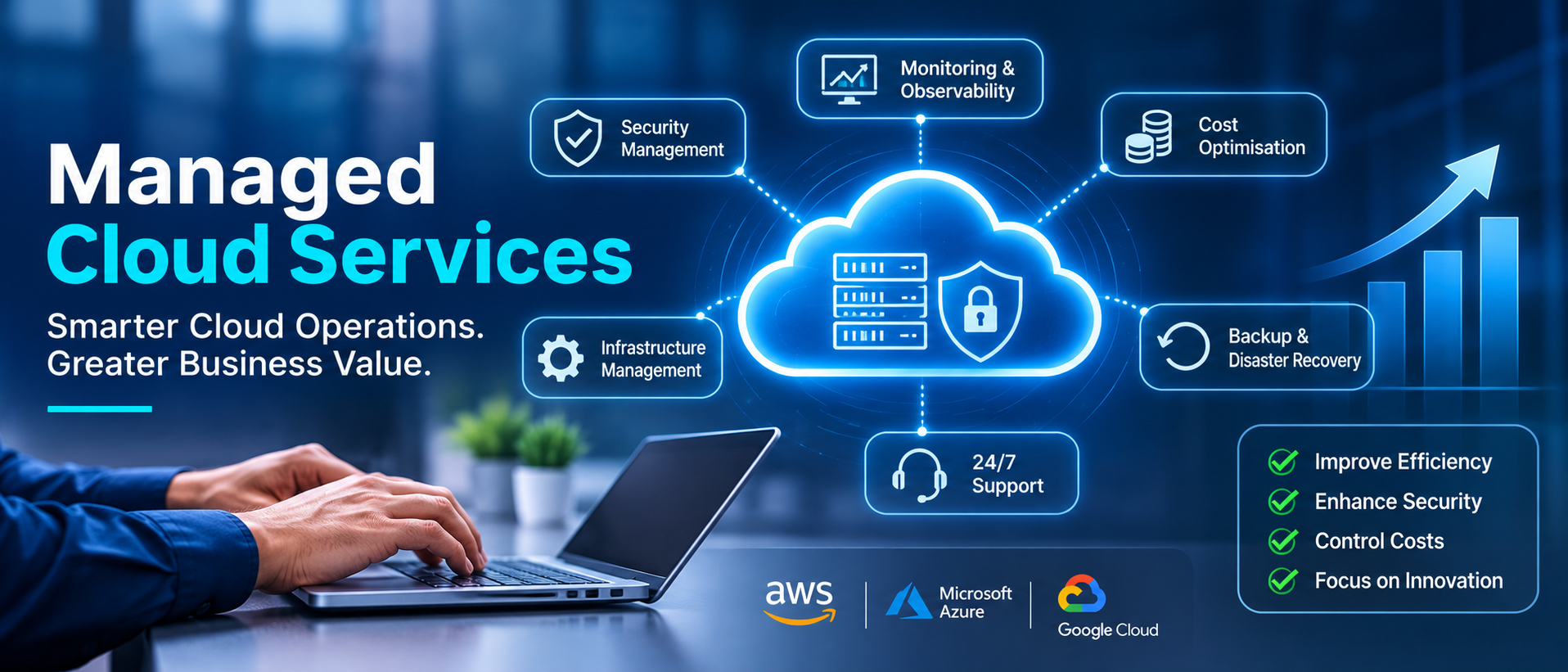
Cloud technology has made it easier for businesses to launch applications, store information, scale infrastructure, and support teams across different locations. However, moving workloads to the cloud does not automatically make IT operations simpler.
As cloud environments grow, businesses often find themselves managing multiple accounts, monitoring alerts, controlling infrastructure costs, applying security updates, maintaining backups, and responding to unexpected technical issues. These responsibilities can become difficult to handle with a small internal IT team, especially when applications need to remain available around the clock.
This is where managed cloud services become valuable.
Managed cloud services allow businesses to work with specialised cloud professionals who take responsibility for agreed areas of cloud infrastructure management, monitoring, security, optimisation, and ongoing operations. Instead of spending all their time maintaining cloud environments, internal teams can focus more on product development, business applications, innovation, and customer experience.
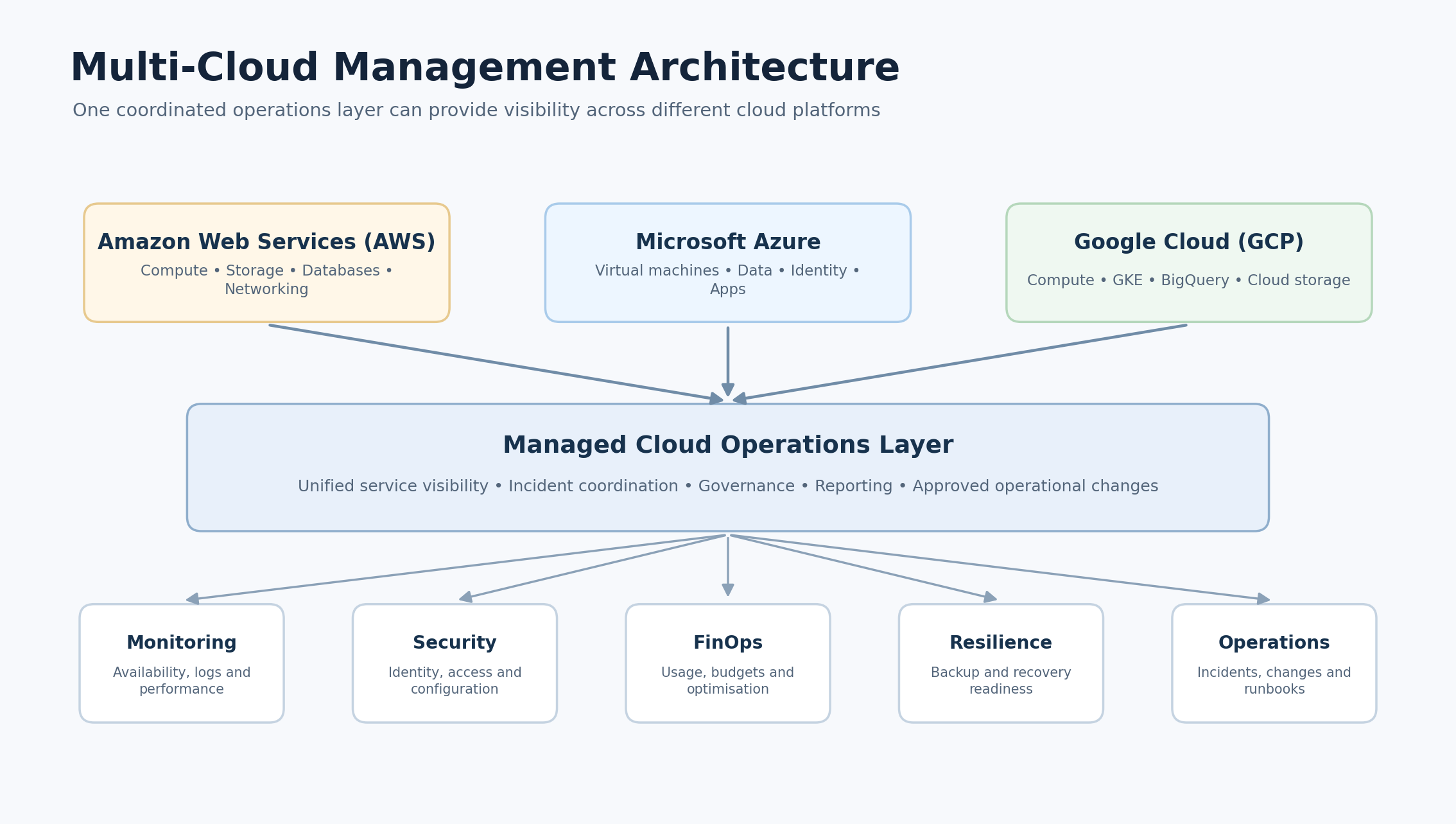
Whether an organisation uses Amazon Web Services (AWS), Microsoft Azure, Google Cloud Platform (GCP), or a combination of these platforms, a managed cloud services provider can help establish a more consistent and reliable operating model.
In this guide, we explain what managed cloud services are, how they work, what they include, when businesses need them, and how to choose the right provider.
What Are Managed Cloud Services?
Managed cloud services are IT services delivered by a specialised third-party provider that manages, monitors, maintains, and optimises some or all of a business's cloud environment.
These services can cover cloud infrastructure, virtual machines, databases, networks, storage, applications, security configurations, backups, disaster recovery, performance monitoring, and cloud cost management.
A managed cloud services provider, often called an MSP or managed cloud service provider, works according to an agreed service scope and service-level agreement (SLA). Depending on the arrangement, the provider may handle routine infrastructure operations, respond to incidents, recommend architectural improvements, and help maintain the cloud environment as business requirements change.
For example, imagine an organisation running its customer-facing application on AWS. Its internal developers build new features, but someone must also monitor server health, investigate performance issues, manage access permissions, review cloud spending, and ensure that backups are working.
If the organisation does not have a dedicated cloud operations team, these responsibilities may fall on developers or general IT administrators.
With managed cloud services, an external cloud operations team can take responsibility for agreed operational activities. The internal team retains control of its application roadmap while specialists handle the day-to-day management of the cloud environment.
The exact responsibilities depend on the service agreement. Managed cloud services do not automatically mean that a provider takes ownership of every IT, application, or security responsibility.
How Do Managed Cloud Services Work?
Managed cloud services usually operate through a structured process that begins with understanding the existing cloud environment and continues through onboarding, monitoring, incident management, and ongoing optimisation.
The provider first reviews the organisation's cloud infrastructure, applications, accounts, dependencies, performance requirements, security controls, and operational challenges. Based on this assessment, the provider defines the responsibilities, monitoring requirements, escalation procedures, reporting arrangements, and service levels.
Once the environment is onboarded, the operations team uses cloud-native and third-party tools to monitor workloads, investigate alerts, manage approved changes, and identify opportunities for improvement.
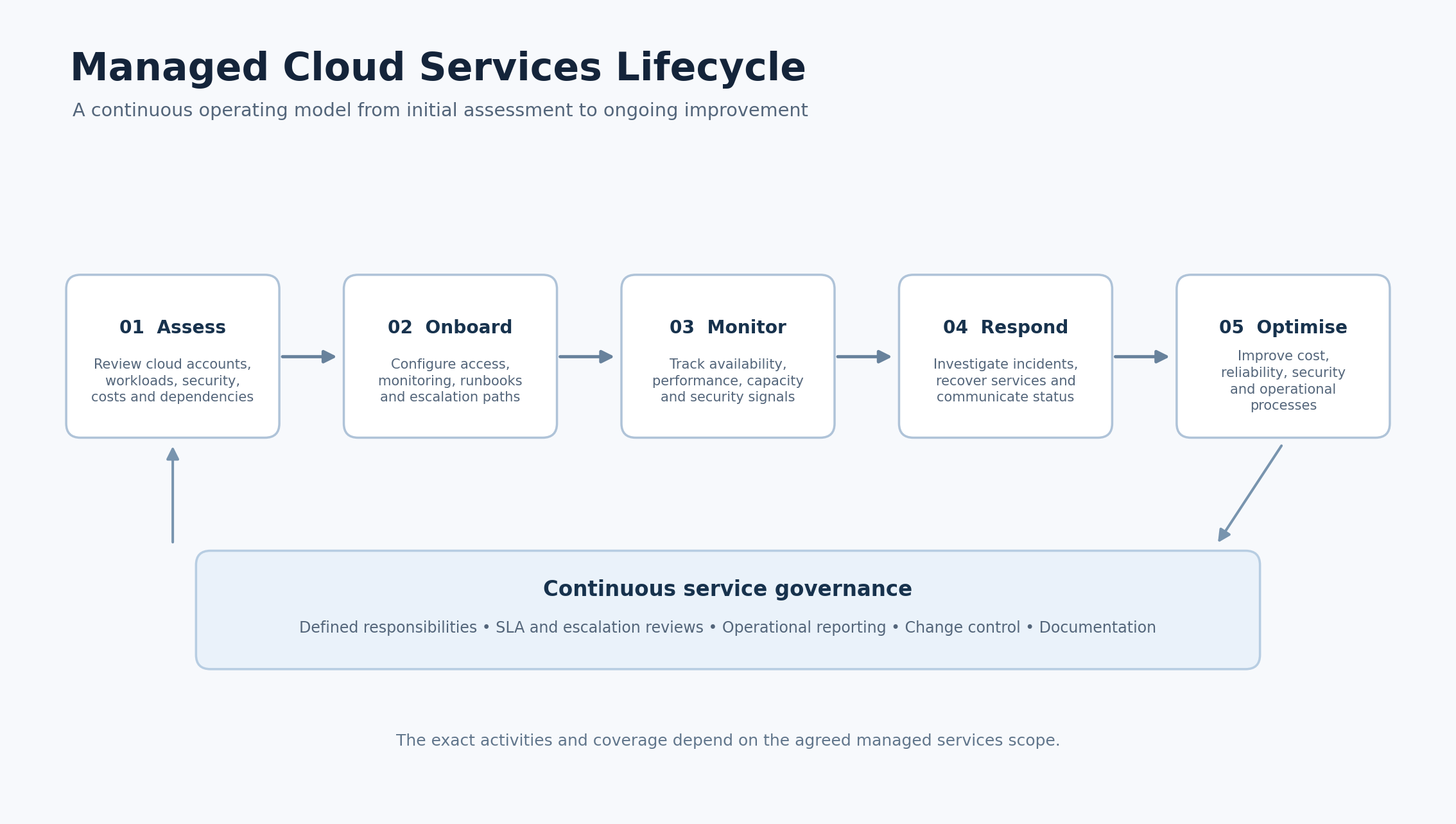
A typical managed cloud operations lifecycle includes the following stages:
1. Cloud environment assessment
The provider reviews the existing cloud setup to understand how infrastructure and applications are deployed.
The assessment may include:
- AWS, Azure, or GCP accounts and subscriptions.
- Virtual machines, containers, and serverless workloads.
- Cloud storage, databases, and networking.
- Application dependencies and critical services.
- Identity and access management configurations.
- Current monitoring and alerting coverage.
- Backup policies and disaster recovery readiness.
- Cloud usage, billing, and resource allocation.
The objective is to understand the current state before making operational changes.
2. Onboarding and configuration
After the assessment, the provider establishes the agreed management environment.
This may involve configuring monitoring agents, connecting cloud accounts, setting up dashboards, defining alert thresholds, reviewing access permissions, documenting operational procedures, and creating escalation paths.
The provider should also agree on which actions can be performed automatically and which require customer approval.
3. Continuous monitoring and operations
Once onboarding is complete, the cloud environment is monitored according to the agreed coverage and service levels.
Monitoring can include infrastructure availability, application performance, CPU and memory utilisation, storage capacity, network behaviour, database health, security alerts, and unusual resource consumption.
When an issue is detected, the operations team investigates it, follows documented procedures, and escalates it when required.
4. Incident response and service recovery
If a cloud service becomes unavailable or behaves unexpectedly, the provider follows an incident response process.
Depending on the agreement, this may include:
- Acknowledging and classifying alerts.
- Investigating the affected service.
- Identifying the likely cause.
- Applying approved recovery procedures.
- Escalating complex issues to engineering teams.
- Communicating progress to stakeholders.
- Documenting the incident and follow-up actions.
A mature service provider does not simply close alerts. It also reviews recurring incidents and recommends changes that reduce the likelihood of similar problems.
5. Continuous optimisation and reporting
Cloud environments change as applications grow, workloads fluctuate, and business priorities evolve.
Managed cloud operations therefore involve regular reviews of infrastructure performance, resource utilisation, cloud expenditure, security configurations, and operational processes.
The provider may recommend right-sizing resources, improving monitoring coverage, adjusting backup policies, removing unused infrastructure, or improving workload architecture.
The objective is to keep the cloud environment aligned with business needs rather than allowing it to become increasingly complex over time.
What Do Managed Cloud Services Include?
Managed cloud services are not a single product with identical features across every provider. They are generally made up of several operational capabilities that can be combined according to an organisation's infrastructure, risk profile, and support requirements.
1. Cloud infrastructure management
Cloud infrastructure management involves maintaining the underlying resources that applications and business systems depend on.
This can include:
- Virtual machine management.
- Cloud storage and database administration.
- Network and firewall configuration.
- Container and Kubernetes platform operations.
- Resource provisioning and decommissioning.
- Operating system maintenance and patch coordination.
- Capacity planning and infrastructure health checks.
For example, an organisation operating an online retail platform may experience higher traffic during seasonal campaigns. Its cloud infrastructure must be capable of handling increased demand without compromising application performance.
A managed cloud operations team can monitor resource utilisation, identify capacity constraints, and coordinate approved scaling activities.
For platform design and operational best practices, businesses can refer to the AWS Well-Architected Framework, which guides building and operating workloads across areas such as reliability, security, performance, and cost optimisation.
2. 24/7 cloud monitoring and incident management
Cloud applications may serve customers across different countries and time zones. A technical issue that occurs outside normal business hours can still affect revenue, customer experience, and business operations.
Cloud monitoring helps teams identify infrastructure and application issues before they become prolonged disruptions.
Typical monitoring activities include:
- Server availability and health checks.
- CPU, memory, and disk utilisation.
- Network latency and connectivity.
- Database performance.
- Application response times.
- Service availability and error rates.
- Security events and infrastructure alerts.
However, monitoring alone is not the same as incident response.
A useful managed cloud service should define who receives alerts, how incidents are classified, what response targets apply, which recovery actions are authorised, and when the customer's internal team must be involved.
3. Cloud security management
Cloud platforms provide security capabilities, but organisations must configure and operate them correctly.
A cloud security management service can help businesses establish and maintain controls across their cloud infrastructure.
Common activities include:
- Identity and access management reviews.
- Role-based access control (RBAC).
- Multi-factor authentication (MFA) enforcement.
- Encryption configuration.
- Network security and firewall reviews.
- Security baseline implementation.
- Vulnerability and configuration assessments.
- Security event monitoring.
- Audit evidence and compliance support.
For example, a business may have several employees, developers, and external contractors accessing its cloud environment. If permissions are not reviewed regularly, users may retain access to resources they no longer need.
A managed cloud team can help implement least-privilege access, review permissions, and monitor security configurations.
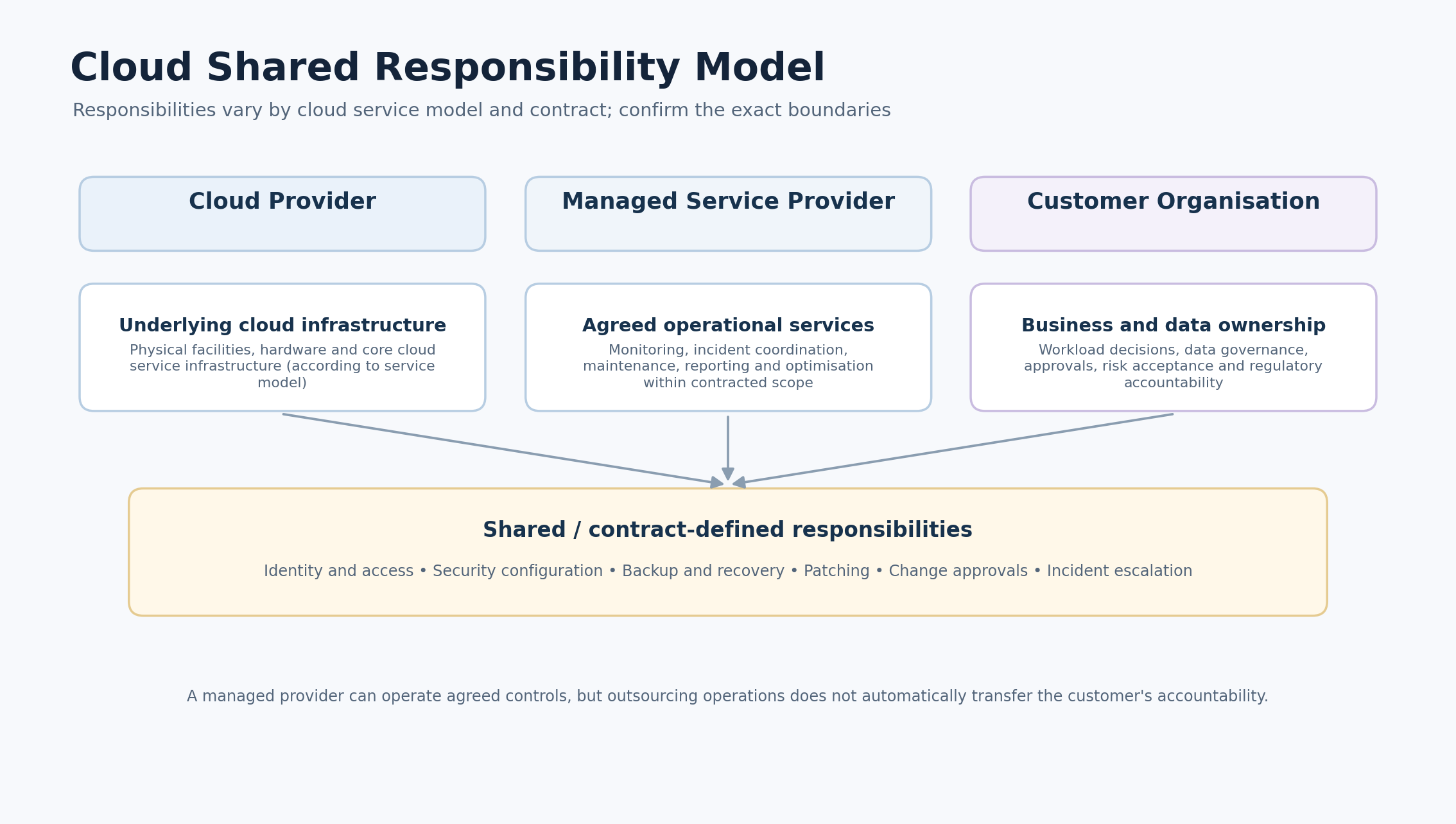
It is important to understand the cloud shared responsibility model. Cloud providers secure the underlying services and infrastructure according to their service model, while customers retain responsibilities for areas such as data, identities, access policies, and workload configuration. A managed service provider can help operate agreed controls, but it does not automatically transfer the customer's legal or regulatory accountability.
Microsoft explains these differences in its Azure shared responsibility documentation. The exact division of responsibilities also depends on whether an organisation uses infrastructure, platform, or software services.
4. Cloud cost optimisation and FinOps
Cloud resources are often billed according to consumption, configuration, service type, and usage patterns. Without regular reviews, organisations may continue paying for resources that are oversized, idle, duplicated, or no longer required.
Cloud cost optimisation focuses on improving the value businesses receive from their cloud spending.
Typical activities include:
- Reviewing cloud billing and usage reports.
- Identifying idle and underutilised resources.
- Right-sizing virtual machines and databases.
- Reviewing storage lifecycle policies.
- Evaluating reserved capacity and commitment discounts.
- Setting budgets and spending alerts.
- Improving resource tagging and cost allocation.
- Forecasting cloud expenditure.
This is closely related to FinOps, a practice that brings engineering, finance, and business teams together to manage cloud spending and maximise business value.
The FinOps Foundation describes FinOps as an operational and cultural practice that helps organisations make informed decisions about technology spending through collaboration and shared accountability.
For example, an organisation may run development and testing environments continuously, even when they are not being used. A cost optimisation review may identify opportunities to schedule non-production resources to stop outside working hours, provided that this is compatible with testing, deployment, and business requirements.
The goal should not simply be to reduce the cloud bill. It should be to balance cost, performance, reliability, and business value.
5. Cloud backup and disaster recovery
Data loss, accidental deletion, infrastructure failures, cyber incidents, and regional outages can affect business continuity.
Cloud backup and disaster recovery services help organisations prepare for these events.
Common activities include:
- Designing backup policies.
- Scheduling and monitoring backups.
- Validating backup completion.
- Testing data restoration.
- Replicating critical workloads where appropriate.
- Documenting recovery procedures.
- Reviewing recovery objectives.
- Conducting disaster recovery exercises.
Two important concepts are:
Recovery Point Objective (RPO): The maximum amount of data loss, measured in time, that the business is prepared to accept after an incident.
Recovery Time Objective (RTO): The target time within which a system or service should be restored after a disruption.
For example, an organisation may decide that its order management system should be restored within two hours and that no more than fifteen minutes of transaction data should be lost. These are illustrative business requirements, not universal standards. The appropriate RTO and RPO depend on the workload's criticality, architecture, cost, and operational needs.
A backup policy is only useful when recovery has been tested. Businesses should ask providers how often restoration tests are performed and whether recovery results are documented.
AWS provides additional guidance on this subject through its Disaster Recovery of Workloads on AWS guidance.
6. Cloud platform management
Businesses often use multiple cloud services, each with its own management tools, permissions, billing structure, and operational processes.
Managed cloud platform services help maintain consistency across these environments.
For example, an organisation may use:
- AWS EC2 for application hosting.
- Amazon RDS for managed databases.
- Microsoft Entra ID for identity services.
- Azure SQL for selected business applications.
- Google Kubernetes Engine (GKE) for container workloads.
- BigQuery for analytics.
A cloud management provider can help coordinate operational activities, monitoring, security reviews, and cost management across the platforms included in the agreement.
7. Cloud performance and capacity management
An application can be technically available but still deliver a poor user experience if response times are slow or resources are constrained.
Cloud performance management focuses on understanding how workloads behave under different conditions.
It may include:
- Monitoring application latency.
- Reviewing database queries and performance.
- Analysing CPU, memory, and storage utilisation.
- Identifying network bottlenecks.
- Reviewing auto-scaling configurations.
- Planning capacity for expected traffic.
- Investigating performance degradation.
A practical example is a SaaS business preparing to onboard a large enterprise customer. The expected increase in users and transactions may require changes to database capacity, application scaling, storage, and monitoring.
Performance planning helps the business prepare before demand creates operational problems.
Which Cloud Platforms Do Managed Service Providers Support?
Many managed cloud providers specialise in one platform, while others support several cloud environments.
The right platform depends on the organisation's existing technology stack, application requirements, compliance needs, internal capabilities, and long-term architecture.
Amazon Web Services (AWS)
Amazon Web Services offers a broad range of cloud infrastructure and platform services.
Managed AWS services may include:
- EC2 virtual machine operations.
- EKS Kubernetes management.
- Lambda serverless operations.
- RDS database management.
- S3 storage management.
- CloudWatch monitoring.
- IAM access governance.
- Cost Explorer and billing optimisation.
- GuardDuty security monitoring.
AWS management is particularly relevant for businesses running cloud-native applications, SaaS platforms, data workloads, and scalable digital products.
Microsoft Azure
Microsoft Azure provides cloud services for infrastructure, applications, databases, analytics, identity, and enterprise workloads.
Managed Azure services may include:
- Azure Virtual Machines.
- Azure Kubernetes Service (AKS).
- Azure App Service.
- Azure SQL.
- Azure Storage.
- Azure Monitor.
- Microsoft Entra ID access management.
- Microsoft Defender for Cloud.
- Azure Cost Management.
Azure can be especially relevant for organisations already using Microsoft technologies and enterprise identity systems.
Businesses can explore Microsoft's Azure Well-Architected Framework for guidance on reliability, security, cost optimisation, operational excellence, and performance efficiency.
Google Cloud Platform (GCP)
Google Cloud offers services for application hosting, data analytics, machine learning, container platforms, and cloud infrastructure.
Managed GCP services may include:
- Google Compute Engine.
- Google Kubernetes Engine (GKE).
- Cloud Run.
- Cloud SQL.
- BigQuery.
- Cloud Monitoring.
- Security Command Center.
- Cloud Billing and cost controls.
GCP is often considered by organisations with data-intensive workloads, analytics requirements, containerised applications, and cloud-native development environments.
The Google Cloud Well-Architected Framework provides guidance for designing and operating workloads with attention to security, reliability, performance, cost, and operational excellence.
AWS vs Azure vs Google Cloud: What Should Businesses Choose?
There is no universally best cloud platform. Each provider offers different services, pricing structures, integration options, and architectural capabilities.
| Evaluation area | AWS | Microsoft Azure | Google Cloud |
|---|---|---|---|
| Core infrastructure | EC2, storage, networking | Virtual Machines, storage, networking | Compute Engine, storage, networking |
| Containers | Amazon EKS | Azure Kubernetes Service | Google Kubernetes Engine |
| Serverless | AWS Lambda | Azure Functions | Cloud Run, Cloud Functions |
| Monitoring | Amazon CloudWatch | Azure Monitor | Google Cloud Operations |
| Cost management | AWS Cost Explorer | Azure Cost Management | Cloud Billing tools |
| Data and analytics | Redshift and AWS analytics services | Microsoft Fabric and Azure analytics services | BigQuery and data services |
Rather than choosing a provider based only on popularity, businesses should assess their application architecture, technical skills, data requirements, security needs, existing software ecosystem, and expected workload patterns.
A managed cloud services provider can help assess these requirements and recommend an appropriate operating model.
What Is the Difference Between Cloud Services and Managed Cloud Services?
The terms cloud services and managed cloud services are related, but they describe different things.
Cloud services are computing resources and capabilities delivered over a network by a cloud provider. These may include virtual machines, databases, storage, networking, application platforms, and software.
Managed cloud services refer to the ongoing management and operational support of those cloud environments by an internal team, an external provider, or a combination of both.
For example, purchasing an AWS EC2 instance gives an organisation access to computing infrastructure. It does not automatically mean that someone will monitor the application, review the operating system, investigate alerts, optimise usage, or manage backup procedures.
Those activities must be handled according to the responsibilities of the selected service model.
A business can use cloud services without a managed services provider. However, when the operational workload becomes difficult to manage internally, it may choose to outsource some responsibilities.
Managed Cloud Services vs In-House Cloud Management
Businesses generally have three broad options for managing their cloud environments:
- Manage everything internally.
- Outsource agreed responsibilities to a managed cloud services provider.
- Use a hybrid model that combines internal ownership with external operational support.
The right choice depends on the size of the cloud environment, the complexity of workloads, internal skills, security requirements, and the level of operational coverage required.
| Factor | In-house cloud management | Managed cloud services |
|---|---|---|
| Team structure | Internal cloud and IT employees | External specialists under an agreement |
| Operational coverage | Depends on internal staffing | Can include extended or 24/7 coverage |
| Technical expertise | Built and maintained internally | Access to provider specialists |
| Monitoring | Managed using internal tools and processes | Managed within agreed service scope |
| Cost structure | Salaries, training, tools, and infrastructure operations | Contracted service fees plus cloud consumption |
| Scalability | Depends on hiring and internal capacity | Support scope can often be adjusted |
| Control | Direct internal control | Shared operational responsibilities |
| Knowledge | Retained within the organisation | Requires documentation and knowledge transfer |
When should a business manage cloud operations internally?
An internal cloud team may be appropriate when:
- The organisation has a mature cloud engineering department.
- Workloads require highly specialised internal knowledge.
- Strict operational control is a priority.
- Internal teams have sufficient coverage and expertise.
- Cloud operations are closely integrated with proprietary systems.
When should a business consider managed cloud services?
Managed cloud services may be useful when:
- Internal IT teams are overloaded with routine operational work.
- The organisation needs monitoring outside normal working hours.
- Cloud infrastructure has become difficult to manage.
- Security and configuration reviews need more consistent attention.
- Cloud spending is growing without clear visibility.
- The business lacks specialist AWS, Azure, or GCP expertise.
- It needs to improve operational processes without hiring an entire team.
Is a hybrid cloud management model better?
For many organisations, a hybrid operating model provides a practical balance.
The internal team retains ownership of architecture, product decisions, business priorities, and sensitive approvals. The external provider manages agreed operational activities such as monitoring, routine maintenance, incident coordination, and cloud cost reviews.
This arrangement allows businesses to retain strategic control while extending their operational capabilities.
What Are the Benefits of Managed Cloud Services?
The value of managed cloud services should be measured through operational improvements and business outcomes rather than simply the number of tasks outsourced.
1. More time for internal teams
Developers and internal IT staff can spend less time handling repetitive infrastructure tasks and more time working on product improvements, application development, and strategic projects.
This is particularly useful when a growing organisation has a small engineering team responsible for both development and production operations.
2. Access to specialised cloud expertise
Cloud environments require knowledge of infrastructure, networking, security, databases, containers, monitoring, and cost optimisation.
A managed cloud provider can give businesses access to specialists across these areas without requiring every skill to be developed internally.
3. Improved operational visibility
A structured monitoring and reporting process gives businesses better insight into infrastructure health, service availability, performance, resource consumption, and incidents.
This makes it easier to identify recurring problems and prioritise improvements.
4. Better cloud cost management
Regular usage reviews can help identify idle resources, oversized infrastructure, unnecessary storage consumption, and opportunities to improve pricing or resource allocation.
The result should be more informed spending decisions rather than cost reduction at the expense of performance or reliability.
5. Stronger operational consistency
Documented runbooks, standardised change procedures, alert escalation paths, and regular service reviews reduce dependence on informal knowledge held by individual employees.
This can make cloud operations more predictable as the organisation grows.
6. Improved business continuity preparation
Backup validation, recovery testing, monitoring, and documented disaster recovery procedures help organisations prepare for unexpected disruptions.
The benefit depends on whether recovery plans are regularly tested and aligned with actual business requirements.
7. Flexible operational support
A managed service arrangement can often be adjusted as the business changes.
For example, a company may initially require basic infrastructure monitoring and gradually add security monitoring, cost optimisation, Kubernetes management, or disaster recovery support.
How Do Managed Cloud Services Help Different Industries?
Managed cloud services are relevant across industries because many organisations depend on cloud-hosted applications, data, and digital infrastructure.
However, the operational priorities differ depending on the type of business.
SaaS and technology companies
SaaS providers need reliable infrastructure to support customer applications, APIs, databases, and integrations.
Managed cloud operations can help with infrastructure monitoring, capacity planning, container management, incident response, and cloud cost control.
For a SaaS business, even a relatively short service disruption can affect customer trust and contractual commitments.
E-commerce and retail
E-commerce platforms experience changes in traffic during promotions, seasonal sales, and marketing campaigns.
Cloud management can support application availability, database performance, storage management, auto-scaling reviews, and monitoring during high-demand periods.
Financial services and fintech
Financial organisations often have demanding security, auditability, data protection, and availability requirements.
Managed cloud services can support access governance, infrastructure monitoring, security configuration reviews, backup management, and compliance evidence collection.
The organisation must still validate that the architecture and provider arrangement meet its specific regulatory obligations.
Healthcare
Healthcare applications may handle sensitive patient and operational information.
Cloud operations can support access controls, encryption configurations, backup validation, monitoring, and availability planning.
Data residency, privacy, retention, and regulatory requirements should be assessed before selecting the cloud architecture or provider.
Manufacturing and logistics
Manufacturing and logistics businesses may use cloud platforms for supply chain systems, inventory applications, analytics, connected devices, and operational reporting.
Managed cloud services can help maintain infrastructure availability, monitor data pipelines, manage integrations, and support performance as connected workloads expand.
Professional services and enterprise organisations
Large organisations often use cloud platforms for collaboration, enterprise applications, databases, document systems, and business intelligence.
Managed services can help coordinate multiple cloud accounts, standardise monitoring, manage infrastructure changes, and maintain consistent operational procedures.
What Are the Different Types of Managed Cloud Services?
Managed cloud services can be organised in different ways depending on the level of responsibility and the technology being managed.
Managed Infrastructure Services
The provider manages agreed infrastructure components such as virtual machines, storage, networks, operating systems, and cloud resources.
This is useful for organisations that want to outsource routine infrastructure administration.
Managed Platform Services
The provider manages selected platform components such as databases, Kubernetes clusters, application hosting environments, and runtime services.
This can help development teams focus on applications rather than maintaining every underlying platform component.
Managed Security Services
These services focus on cloud security monitoring, identity governance, security configurations, vulnerability management, and incident coordination.
They may complement an organisation's internal security team or broader managed security services.
Managed Cloud Operations
This model focuses on the daily operation of cloud environments.
It may include 24/7 monitoring, incident management, routine maintenance, performance checks, operational reporting, and service coordination.
Managed Multi-Cloud Services
Organisations that use more than one cloud platform may require a consistent approach to monitoring, cost management, security, and operational processes.
Managed multi-cloud services help coordinate agreed responsibilities across AWS, Azure, GCP, and potentially private or hybrid cloud environments.
What Is Multi-Cloud Management and Why Does It Matter?
Multi-cloud management means operating and governing workloads across multiple cloud providers.
A business might use AWS for its customer-facing applications, Azure for selected enterprise services, and Google Cloud for analytics. This may happen because different platforms suit different technical requirements, acquisitions introduce new environments, or business units make independent technology decisions.
However, using multiple cloud platforms can create operational complexity.
Each provider has different:
- Resource structures and terminology.
- Identity and access management systems.
- Monitoring and logging tools.
- Billing and cost allocation models.
- Security configuration options.
- Service limits and operational processes.
Without a coordinated approach, teams may struggle to understand the overall health, cost, and security posture of their cloud estate.
A managed multi-cloud service can help establish consistent reporting, operational ownership, incident procedures, access reviews, and cost visibility across supported platforms.
The objective is not to force every cloud provider into an identical architecture. It is to create a consistent management approach while respecting the technical differences between platforms.
How to Choose the Right Managed Cloud Services Provider
Choosing a managed cloud provider is an operational decision that can affect application availability, security, cost management, and internal team productivity.
Businesses should look beyond marketing claims and evaluate how a provider will manage their actual environment.
1. Check cloud platform expertise
Confirm that the provider has relevant experience with the cloud platforms used by your organisation.
If your infrastructure runs on AWS, Azure, and GCP, ask how the provider handles monitoring, incident response, access management, and cost reporting across all three.
Ask about the specific services and technologies that matter to your workloads.
2. Understand the service scope
A provider may advertise complete cloud management while offering only limited monitoring or infrastructure support.
Ask exactly which activities are included.
For example:
- Does the service include infrastructure monitoring?
- Who responds to critical alerts?
- Are operating system patches included?
- Who manages backups and restoration tests?
- Is cloud cost optimisation included?
- Are security configuration reviews performed?
- Does the provider manage Kubernetes or databases?
- Which activities require customer approval?
The answers should be documented in the service agreement.
3. Review the SLA and escalation process
An SLA should explain the service commitments and responsibilities.
Review:
- Service availability commitments, where applicable.
- Incident severity definitions.
- Response and escalation targets.
- Support hours and coverage.
- Communication expectations.
- Maintenance windows.
- Reporting frequency.
- Service exclusions and dependencies.
Do not confuse response time with resolution time. A provider may acknowledge an incident within a specified period without guaranteeing that the underlying issue will be resolved in that same period.
4. Evaluate security and access controls
A provider may need access to your cloud environment to perform its responsibilities.
Before granting access, understand how it manages:
- Least-privilege permissions.
- Role-based access.
- Multi-factor authentication.
- Privileged accounts.
- Credential storage and rotation.
- Audit logging.
- Access reviews.
- Staff and subcontractor access.
Access should be limited to the resources and actions necessary to deliver the agreed service.
5. Ask about backup and disaster recovery testing
Do not assume that a provider's backup offering automatically guarantees recovery.
Ask how backup success is monitored, how restoration is validated, how frequently recovery tests are conducted, and whether the results are documented.
Discuss RTO and RPO requirements for each critical workload.
6. Understand cloud cost reporting
A useful provider should help explain where cloud spending is going and why it changes.
Ask whether reporting includes resource-level cost visibility, tagging, budget alerts, usage trends, forecasting, and optimisation recommendations.
The provider should also explain how it measures the impact of optimisation actions.
7. Check onboarding and documentation
A structured onboarding process should include an infrastructure inventory, architecture overview, access configuration, monitoring setup, operational runbooks, escalation paths, and agreed reporting procedures.
Good documentation is essential. It protects the business from becoming dependent on undocumented knowledge held by one provider or engineer.
8. Review communication and service governance
Managed cloud services involve ongoing collaboration.
Ask who your primary contact will be, how often service reviews take place, how changes are approved, and how major incidents are communicated.
A technically capable provider should also be able to explain operational issues in language that business stakeholders can understand.
What Does a Managed Cloud Services SLA Typically Cover?
A service-level agreement defines the operational commitments between the customer and the provider.
The exact terms differ by provider and service package, but a managed cloud SLA may cover the following areas:
| SLA component | What it should define |
|---|---|
| Monitoring coverage | Which systems and services are monitored and during which hours |
| Incident response | How incidents are classified, acknowledged, and escalated |
| Support coverage | Whether support is business-hours, extended-hours, or 24/7 |
| Maintenance | How routine maintenance and planned changes are handled |
| Reporting | What operational and performance reports are provided |
| Backup management | Which backup activities are included and how they are validated |
| Security operations | Which security monitoring and response activities are covered |
| Service exclusions | Activities that remain the customer's responsibility |
A well-defined SLA should make responsibilities measurable and avoid ambiguous promises such as guaranteed resolution of every issue within a fixed time.
How Much Do Managed Cloud Services Cost?
Managed cloud services pricing depends on the size and complexity of the environment, the number of workloads, the level of operational coverage, and the responsibilities included in the agreement.
There is no single price that applies to every business.
Common factors that influence managed cloud service costs include:
1. Cloud environment size: The number of accounts, subscriptions, virtual machines, databases, applications, and other resources can influence the level of management required.
2. Support coverage: Business-hours support, extended coverage, and 24/7 operations have different staffing and operational requirements.
3. Workload criticality: Business-critical applications may require more detailed monitoring, stricter escalation procedures, and additional recovery planning.
4. Security requirements: Advanced access governance, security monitoring, audit support, and compliance requirements can affect the service scope.
5. Platform complexity: Managing a single cloud environment is generally different from coordinating multiple providers, hybrid infrastructure, and complex integrations.
6. Service responsibilities: Monitoring-only support is different from full infrastructure administration, incident response, disaster recovery testing, and ongoing optimisation.
When comparing providers, businesses should assess the total value of the service rather than looking only at the monthly management fee.
The cloud consumption bill, provider charges, additional tools, support exclusions, and internal effort should all be considered.
Common Challenges Managed Cloud Services Can Help Address
Managed cloud services are most useful when they solve identifiable operational problems. Some common challenges include:
Uncontrolled cloud spending
Without regular cost reviews, cloud resources may remain active long after they are needed.
A provider can help establish tagging, budgets, usage reporting, and optimisation reviews.
Limited monitoring visibility
Different teams may use different dashboards and alerting tools, making it difficult to understand the health of the overall environment.
A coordinated monitoring strategy can improve visibility and clarify operational ownership.
Lack of specialist cloud skills
An organisation may have strong software developers but limited expertise in Kubernetes, networking, cloud security, or infrastructure automation.
Managed cloud services can extend internal capabilities with specialist support.
Inconsistent security configurations
Multiple accounts and subscriptions can develop inconsistent access policies, logging settings, and security controls.
Regular reviews and standardised baselines can help reduce configuration gaps.
Unclear incident ownership
When developers, IT administrators, cloud vendors, and external support teams are involved, incidents can be delayed because nobody knows who is responsible for the next action.
Documented escalation paths and operational runbooks help establish clear ownership.
Unverified disaster recovery plans
An organisation may have backups but no recent evidence that critical systems can be restored within business recovery requirements.
Regular recovery exercises help identify problems before an actual disruption occurs.
How to Measure the Performance of Managed Cloud Services
Businesses should measure managed cloud services through meaningful operational and business indicators.
The right KPIs depend on the service scope and the criticality of the workloads.
| KPI | What it measures | Why it matters |
|---|---|---|
| Service availability | Whether a service is accessible when required | Helps assess reliability |
| Mean Time to Acknowledge (MTTA) | Average time taken to acknowledge an incident | Measures alert-handling responsiveness |
| Mean Time to Resolve (MTTR) | Average time taken to resolve incidents | Helps assess incident recovery performance |
| Incident recurrence rate | How often similar incidents happen again | Identifies unresolved underlying problems |
| Backup success rate | Whether scheduled backups complete successfully | Supports data protection monitoring |
| Recovery test success | Whether recovery procedures meet their targets | Validates disaster recovery readiness |
| Cloud cost variance | Difference between forecast and actual spending | Improves financial visibility |
| Resource utilisation | How effectively cloud resources are used | Helps identify inefficiencies |
| Security remediation progress | Status of identified security issues | Tracks risk reduction |
These metrics should be reviewed together rather than in isolation.
For example, reducing cloud expenditure is not necessarily a positive result if it causes application performance to deteriorate. Similarly, a high number of resolved incidents may indicate responsive support, but it may also reveal recurring infrastructure problems.
The best service reviews connect operational metrics with business outcomes.
Managed Cloud Services Implementation: A Practical Roadmap
Moving to a managed cloud services model should be treated as an operational transition, not simply a decision to give an external provider access to cloud accounts.
A structured implementation helps protect existing workloads and makes responsibilities clear.
Step 1: Identify business and technical requirements
Start by documenting the workloads, platforms, business priorities, compliance requirements, and support expectations.
Identify which applications are business-critical and which services need round-the-clock coverage.
Step 2: Inventory the cloud environment
Create an inventory of cloud accounts, subscriptions, resources, applications, databases, networks, dependencies, and current operational tools.
This provides the foundation for onboarding and risk assessment.
Step 3: Define responsibilities
Agree on which activities will be managed internally and which will be handled by the provider.
Document responsibilities for monitoring, incident response, access management, patching, backups, security reviews, and infrastructure changes.
Step 4: Establish security and access controls
Set up the required permissions using least-privilege principles.
Review privileged accounts, MFA requirements, logging, credential handling, and approval procedures before operational access is granted.
Step 5: Configure monitoring and operational procedures
Connect the agreed systems to monitoring tools, establish alert thresholds, document runbooks, and define escalation procedures.
Critical alerts should have a clear owner and a documented response path.
Step 6: Validate backup and recovery arrangements
Review backup policies, retention requirements, restoration procedures, and disaster recovery objectives.
Test recovery for critical workloads rather than relying only on backup completion notifications.
Step 7: Begin managed operations and review performance
Start the agreed service, monitor operational performance, and hold regular reviews.
Use incident trends, cloud spending, resource utilisation, and service reports to identify improvement opportunities.
Managed Cloud Services Best Practices for Businesses
Businesses can get more value from managed cloud services by establishing good operational practices from the beginning.
Maintain a clear cloud inventory. Keep an updated record of accounts, resources, applications, owners, and dependencies.
Use consistent resource tagging. Apply meaningful tags for business units, environments, applications, owners, and cost allocation.
Follow least-privilege access. Give users and providers only the permissions needed for their responsibilities.
Automate repeatable tasks carefully. Use automation for approved routine activities, while retaining human review for sensitive or high-impact changes.
Test recovery procedures. Verify that backups can actually restore business-critical systems.
Review cloud costs regularly. Compare usage with business demand and investigate unexpected spending changes.
Document operational procedures. Maintain runbooks for common incidents, maintenance tasks, and recovery activities.
Review architecture as the business grows. A cloud setup that works for a small application may not be suitable for a larger customer base or more complex workloads.
What Is the Future of Managed Cloud Services?
Managed cloud services are evolving as organisations adopt more complex application architectures and rely on cloud infrastructure for increasingly important business activities.
Several developments are shaping the future of cloud operations.
AI-assisted cloud operations
AI-assisted operations can help analyse logs, identify unusual patterns, summarise incidents, and support troubleshooting.
These capabilities may help engineers investigate issues faster, but automated recommendations and actions still need appropriate permissions, validation, and oversight.
Greater focus on FinOps
As cloud environments become more distributed, organisations need better visibility into how technology spending relates to business value.
FinOps practices are increasingly important for connecting engineering decisions, financial accountability, forecasting, and workload optimisation.
More automation and Infrastructure as Code
Infrastructure as Code tools allow teams to define and manage cloud infrastructure through version-controlled configuration.
Combined with CI/CD pipelines and policy checks, automation can improve consistency, reduce manual configuration work, and make infrastructure changes easier to review.
Stronger security and governance
Cloud security will continue to require attention to identity, access, data protection, configuration, monitoring, and compliance.
Businesses will need operational models that make these controls part of everyday cloud management rather than treating security as an occasional review.
Hybrid and multi-cloud operations
Many organisations will continue to operate across public cloud, private cloud, and on-premises environments.
Managed cloud providers will increasingly need to support unified operational visibility while recognising the different technical and governance requirements of each environment.
How Spectrum Future Technology Helps Businesses Manage Cloud Environments
Managing cloud infrastructure requires more than provisioning resources and keeping servers online. Businesses need an operational approach that brings together monitoring, incident response, security, cost control, and ongoing optimisation.
Spectrum Future Technology provides managed cloud management services for businesses operating across AWS, Microsoft Azure, and Google Cloud.
Its cloud management offering is designed to help organisations manage cloud operations through a combination of certified engineering expertise, monitoring, FinOps practices, disaster recovery support, and platform management.
Depending on the agreed requirements, Spectrum's cloud management capabilities include:
- 24/7 cloud operations: Monitoring, incident response, and platform management.
- FinOps and cost optimisation: Reviewing cloud consumption, identifying inefficiencies, and improving cost visibility across AWS, Azure, and GCP.
- Cloud disaster recovery: Backup validation, recovery planning, testing, and availability monitoring.
- Cloud platform management: Operational support for public, private, hybrid, and multi-cloud environments.
- Cloud monitoring: Proactive monitoring of cloud services, observability, and approved recovery procedures.
- Security and governance: Access management, security baselines, encryption standards, and compliance-aware operational processes.
Spectrum also supports organisations that need to connect cloud operations with broader infrastructure and engineering capabilities.
If your business is planning a cloud transformation, explore Spectrum's Cloud Migration Services. For teams looking to automate infrastructure provisioning and software delivery, its DevOps Automation Services can support a more consistent deployment and operations process.
You can also explore IT Infrastructure Management for support across physical, virtual, and hybrid IT environments.
To understand how these capabilities can support your organisation, visit Spectrum's Cloud Management Services and request a cloud operations assessment.
Final Thoughts
Cloud adoption is not a one-time technology decision. As applications, users, data, and business requirements grow, the work involved in operating cloud infrastructure grows with them.
Managed cloud services provide a structured way to handle these responsibilities through specialist expertise, defined operational processes, continuous monitoring, security management, disaster recovery planning, and cost optimisation.
The right arrangement does not require businesses to surrender control of their technology. Instead, it allows them to decide which responsibilities should remain internal and which can be managed by an external team.
For organisations using AWS, Azure, Google Cloud, or a combination of platforms, the most effective approach is one that connects cloud operations with measurable business requirements: reliable applications, controlled spending, secure infrastructure, and the ability to scale confidently.
Frequently Asked Questions About Managed Cloud Services
1. What are managed cloud services in simple terms?
Managed cloud services are services provided by a specialist company that helps manage a business's cloud infrastructure and operations. This may include monitoring, maintenance, security, cost optimisation, backups, and incident response.
2. What does a managed cloud services provider do?
A managed cloud services provider performs agreed operational activities such as monitoring cloud resources, managing infrastructure, investigating incidents, reviewing security configurations, optimising cloud usage, and supporting backup and recovery processes.
3. What is the difference between cloud services and managed cloud services?
Cloud services provide computing resources such as servers, databases, storage, and networking. Managed cloud services provide ongoing operational management and support for those resources.
4. Which cloud platforms do managed cloud providers support?
Many providers support Amazon Web Services (AWS), Microsoft Azure, and Google Cloud Platform (GCP). Some also support private cloud, hybrid cloud, and multi-cloud environments.
5. Are managed cloud services suitable for small businesses?
Yes. Small businesses can use managed cloud services when they need specialist support but do not have the resources to maintain a dedicated cloud operations team. The service scope should match the size and complexity of the environment.
6. Are managed cloud services suitable for enterprises?
Yes. Enterprises often operate complex cloud environments across multiple teams, accounts, regions, and platforms. Managed services can support monitoring, governance, security operations, cost management, and operational consistency.
7. Do managed cloud services include 24/7 monitoring?
Some managed cloud service agreements include 24/7 monitoring and incident response, while others provide business-hours or extended support. Businesses should verify the actual coverage and escalation commitments in the SLA.
8. Can managed cloud services reduce cloud costs?
They can help identify unnecessary spending through resource right-sizing, idle resource detection, usage analysis, tagging, budget alerts, and commitment optimisation. Actual savings depend on the existing environment and the improvements that can be implemented.
9. What is FinOps in managed cloud services?
FinOps is a practice that connects engineering, finance, and business teams to manage cloud spending and maximise the value of cloud investments. Managed cloud providers may support FinOps through reporting, cost allocation, forecasting, and resource optimisation.
10. Are managed cloud services secure?
Managed cloud services can help improve security through access governance, encryption configuration, monitoring, security baselines, and incident procedures. However, security depends on the architecture, provider responsibilities, customer controls, and ongoing governance.
11. What is included in a managed cloud services SLA?
An SLA may define monitoring coverage, incident response targets, support hours, escalation procedures, maintenance responsibilities, reporting, service availability commitments, and exclusions. The exact terms depend on the agreement.
12. What is the difference between managed cloud services and cloud hosting?
Cloud hosting provides the infrastructure or platform used to host applications and data. Managed cloud services add operational responsibilities such as monitoring, maintenance, security management, incident response, and optimisation.
13. Can a business use managed cloud services across multiple providers?
Yes. Managed multi-cloud services can support environments using AWS, Azure, Google Cloud, and other platforms. The provider should explain how it coordinates monitoring, access, cost reporting, and operational responsibilities across those environments.
14. How do businesses choose a managed cloud services provider?
Businesses should evaluate platform expertise, service scope, SLA terms, security controls, monitoring capabilities, backup and recovery processes, cost reporting, documentation, and communication practices.
15. When should a business consider managed cloud services?
A business should consider managed cloud services when its cloud environment becomes difficult to operate internally, cloud spending is hard to control, monitoring coverage is limited, specialist skills are missing, or applications require more consistent operational support.